
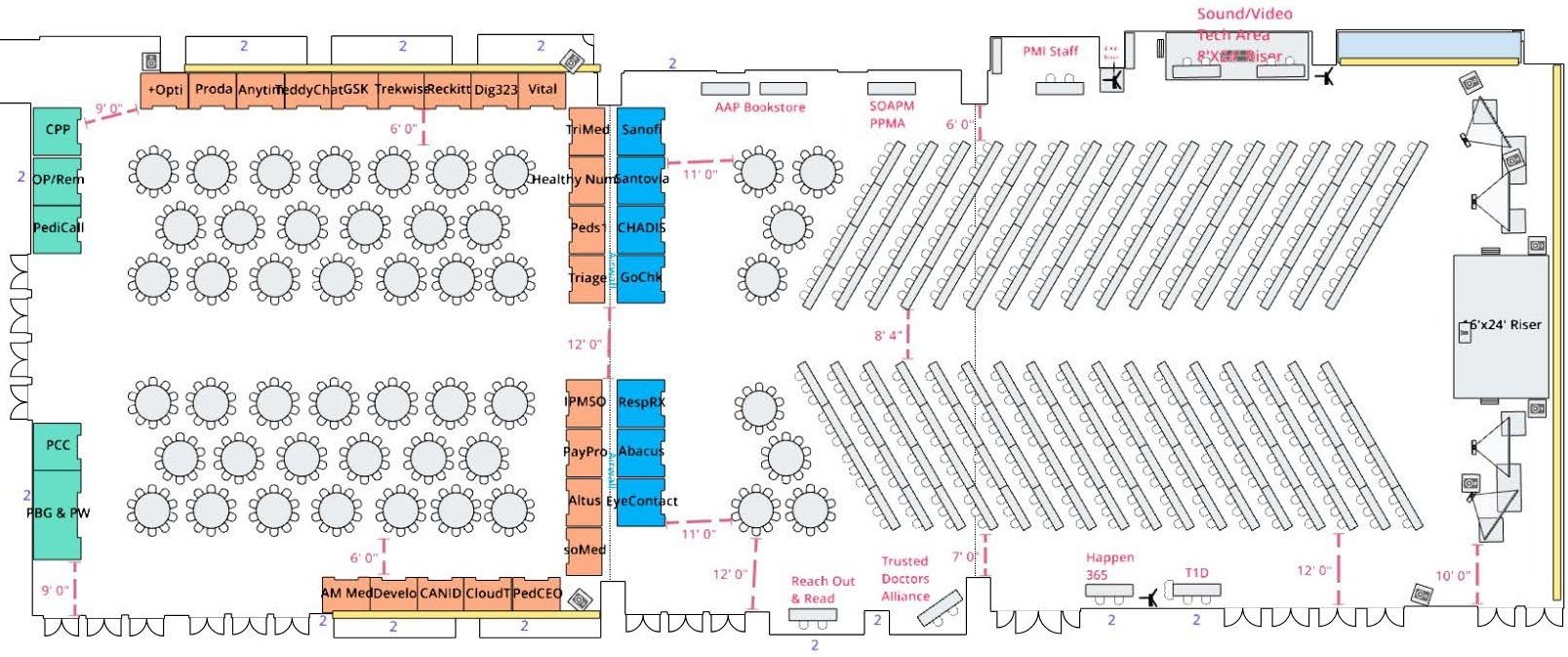
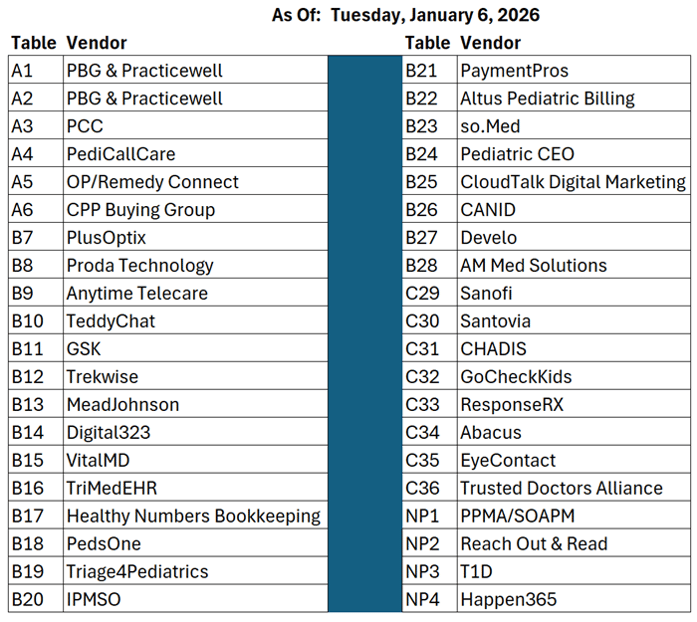
PMI Conference 2026 Vendor FAQ
-
Attendee Info Requested
Below is a link to let us know who will be attending on behalf of your organization. This will be used to ensure that the correct badges are printed, etc. The password was previously emailed to the primary contact for your organization. If you are unable to locate it, please contact us.
Here's the link: https://survey.alchemer.com/s3/8637112/PMI-Conference-Vendor-Sponsor-Attendees-2026
-
Reminders:
1. Room Block Closes January 14th: If you have not reserved rooms for your people representing your company, click here to access the discounted room block.2. Vendor Pass Limit: As a reminder, the vendor tables come with a single vendor pass. If you anticipate more than one person attending under the vendor table purchase, be sure to order your additional vendor pass(es).


Access to the hotel room block will close January 14, 2026
As of today, there are still room available outside the discount block. Click here to reserve your room(s) in the discounted hotel room block ($235 per night)
Each vendor table comes with one (1) vendor pass. If you need more, they can be purchased here: https://pmi2026sponsor.rsvpify.com/
We will be handing out 450 conference bags. Please plan to ship them to the following address to arrive no later than Wednesday, January 23, 2026:
Paul Vanchiere
17803 Country Cove
Cypress, TX 77433
The following vendors/sponsors have purchased the "Welcome Bag Insert" option:
- Altus Pediatric Billing
- AM Med Solutions
- Canid
- CloudTalk USA
- PedsOne
- Reckitt/Mead Johnson
- TeddyChat
- VitalMD
If you would like to purchase the option to include Welcome Bag materials, please visit: https://pmi2026sponsor.rsvpify.com
If you are unable to ship the materials to arrive before Wednesday, January 23, 2026, vendors will be permitted to bring the inserts to the conference but must be hand-delivered to PMI staff by 9:00 the morning of Thursday, February 5, 2026 to ensure they can be placed in the welcome bags.
-
- Vendor pass for up to on individual that allows for the following:
- Participate in all conference education session(s)
- Join attendees for all conference cocktail parties, meals, and breaks
- 6-foot skirted table
- Two chairs
- Waste basket
- Complimentary WiFi Access
- Electrical service for up to 4 devices
- Posting of vendor information in the conference app.
- Complimentary use of QR scanner via conference app (New for 2026)
Vendors are free to set up their tables during the following times:
-
Wednesday, February 4, 2026
-
Between 6:30PM and 10:00PM
-
-
Thursday, February 5, 2026
-
Between 9:00AM and 5:00PM
-
Between 8:30PM and 10:00PM
-
-
Friday, February 6, 2026
-
Between 6:30AM and 10:00AM
-
Unlike other conferences, there will not be any official "Exhibit Hall Hours". As with past PMI conferences, the meals, breaks, and cocktail parties will take place in the vendor areas. To gain maximum exposure, these are the times that attendees will be in the vendor areas, etc.
-
Thursday, February 5, 2026
-
Cocktail Party- 5:00 - 7:00PM
-
-
Friday, February 6, 2026
-
Breakfast- 7:00-9:00AM
- Luncheon- 11:30AM- 12:30PM
- Afternoon Break- 2:30-3:00PM
-
Cocktail Party- 5:00-7:00PM
-
-
Saturday, February 7, 2026
-
Breakfast- 7:00-9:00AM
-
Luncheon- Noon-1:00PM
-
Afternoon Break- 3:00-3:30PM
- Cocktail Party- 5:30-7:30PM
All times are subject to adjustments. Please plan to utilize the conference app for any updates, etc.
-
Conference App Details
Each attendee associated with a vendor at the conference will have access to modify the Exhibitor and Sponsor profiles as well as scan QR codes.
If you like to set up your Exhibitor profile from a desktop, please visit this link after you have sucessfully logged iinto the conference app from your mobile device:
https://hjpadouhuphjcft.eventify.io
To modify the Exhibitor or Sponsor profile(s) via the mobile app, please follow these steps:
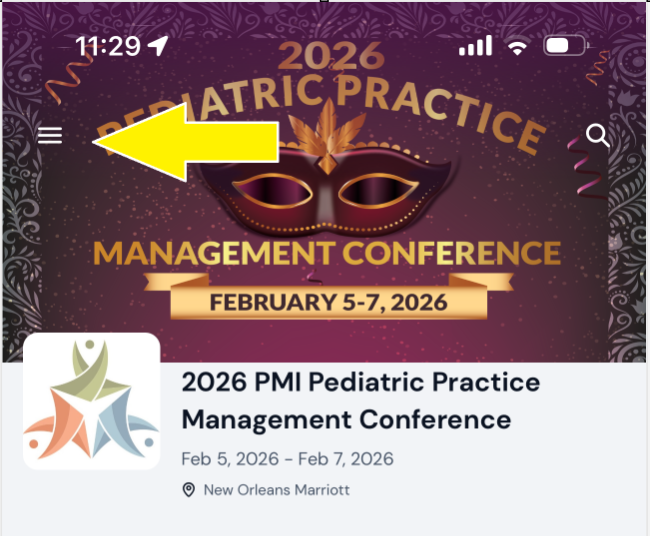
1. After logging in, you will see an option at the top left to expand the left-side menu:
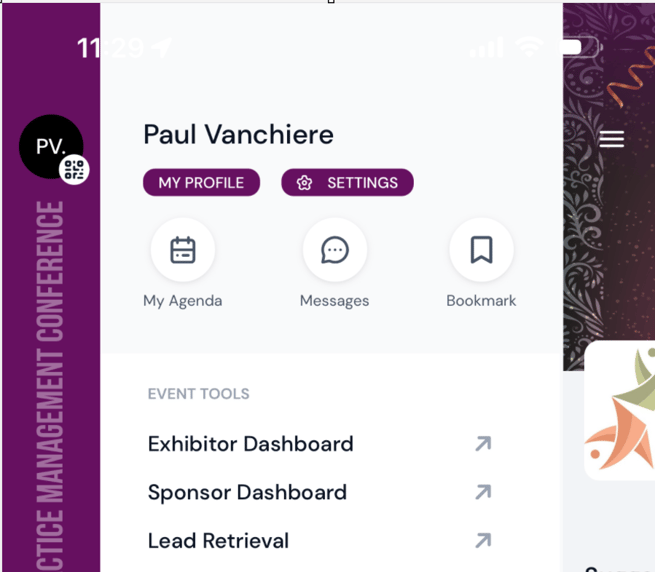
2. After expanding the left side menu, you will notice options to access your associated Exhibitor and Sponsor dashboards:
Please note that Sponsors are organizations sponsoring individual conference sessions (presentations, meals, cocktail parties, etc). If you are a sponsor for any sessions, you will repeat the process for your Sponsor profile (sorry, you have to do it twice, but the platform offers no alternative).
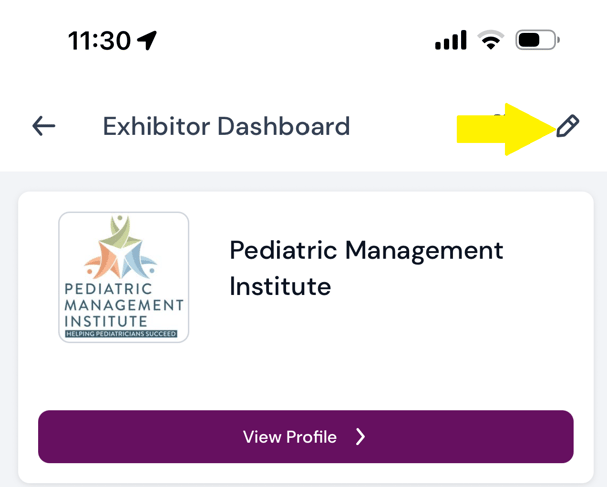
3. After clicking to access your Exhibitor Dashboard, you will see the option to edit the Exhibitor profile at the top right:
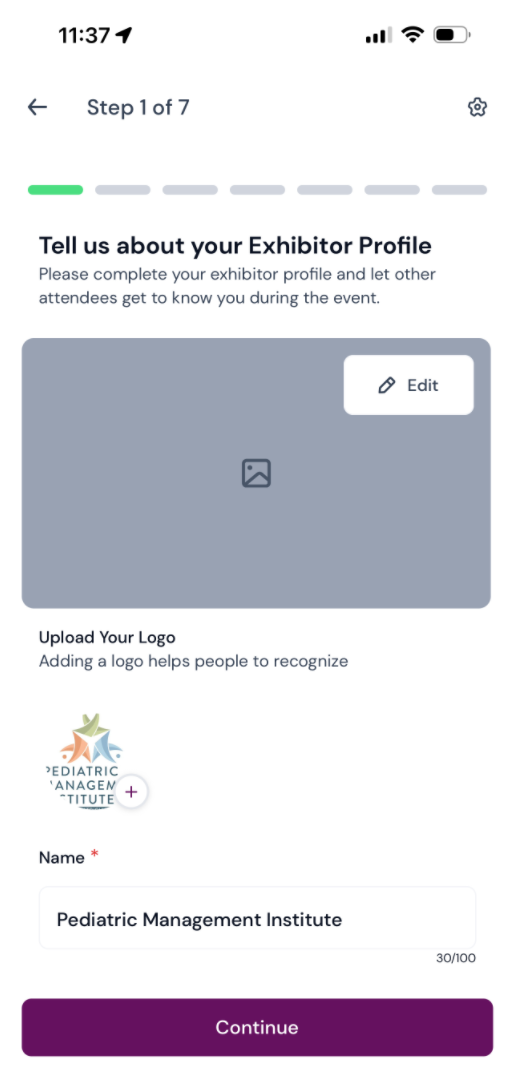
4. Now you will have access to the 7-step process to edit/modify your Exhibitor profile:
If you prefer, you can also modify your Exhibitor/Sponsor profile via the desktop version of the conference app found here:
https://hjpadouhuphjcft.eventify.io
During the conference, you will have access to scan QR codes directly from the attendee's app.
1. When approached by an attendee, ask them to open the app and click the "My QR Code" icon found at the bottom of the conference app home screen:

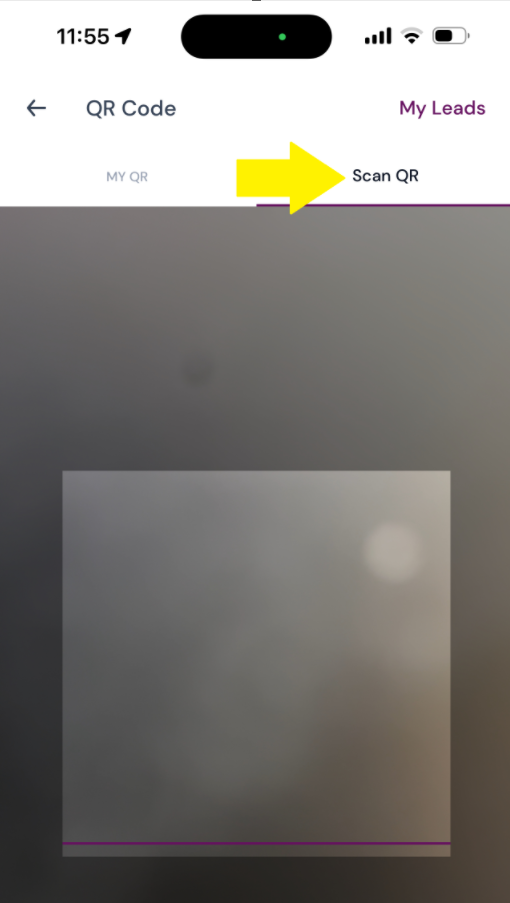
2. While the attendee pulls up their QR Code, the Exhibitor will do the same, but click on the option to "Scan QR":
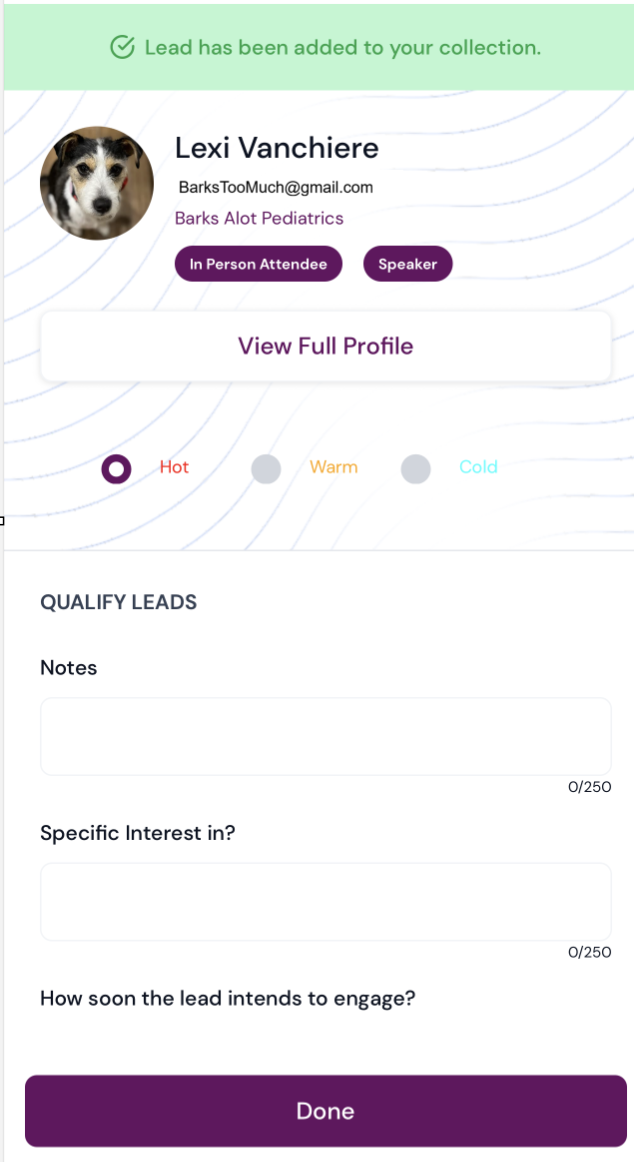
3. You will then scan the attendee's QR code, followed by a confirmation message, as well as available fields to enter your notes:
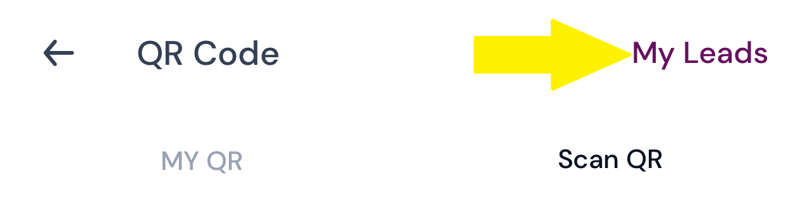
4. At any time, you can see a summary of your QR scans by clicking "My Leads":
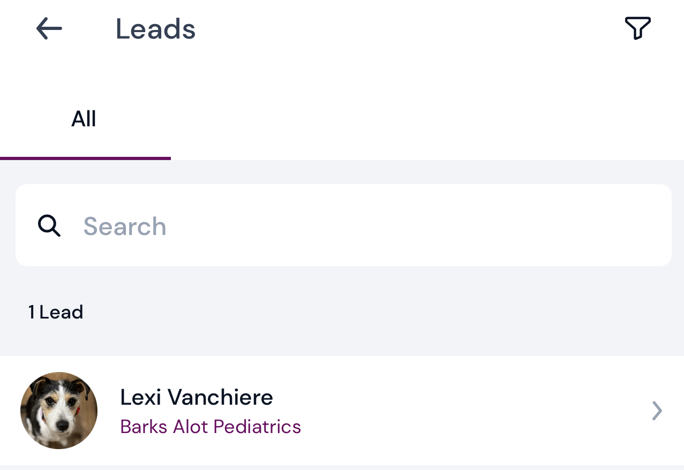
5. From there, you will find a summary of all of your scanned QR codes and notes:
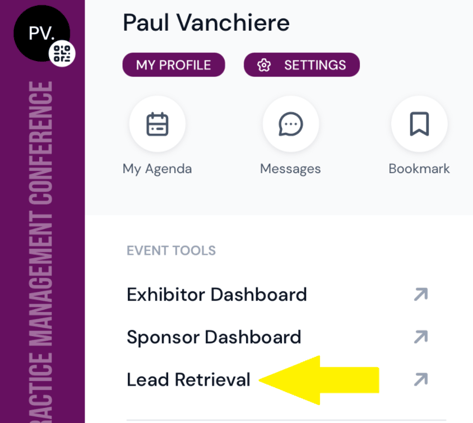
6. You will be able to see all of your organization's leads by clicking on "Lead Retrieval" from the left hand slide out menu:
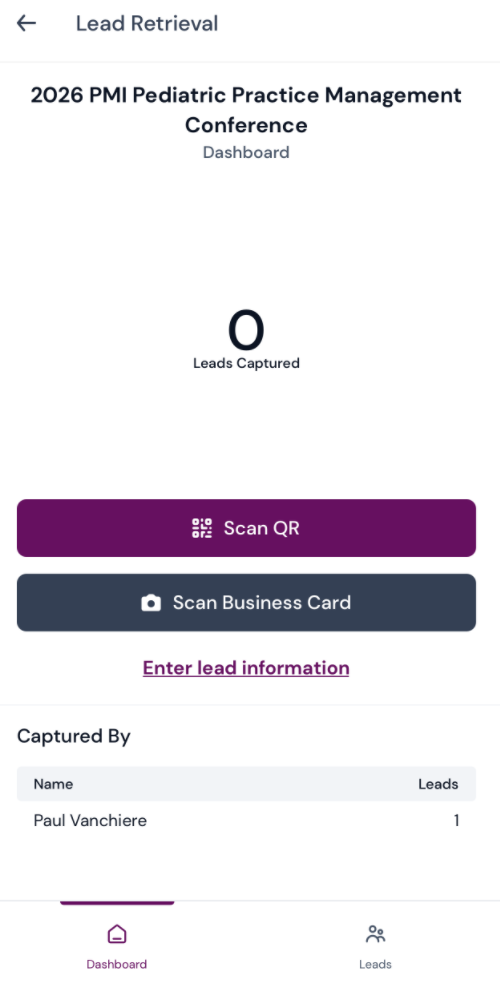
7. Your organization's leads will be grouped by the person who captured the lead(s):
Get Started Now
Total Investment: $799 (Savings over $2,000)
Regularly priced at $2,799 offered for a limited time
We guarantee your complete satisfaction! Should you feel that PMI's analysis hasn't fully met your expectations, ignore the invoice!


